
In this article
- What is data roaming?
- How much does data roaming cost?
- Should data roaming be on or off?
- Keep data roaming off when
- Turn data roaming on when
- How to turn data roaming on or off
- On iPhone
- On Android
- What happens if you leave data roaming on?
- Cheaper alternatives to data roaming
- 1. Hotel and café Wi-Fi
- 2. A local SIM card
- 3. Pocket Wi-Fi
- 4. A travel eSIM
- Data roaming vs a travel eSIM
- Popular destinations where roaming gets expensive
- Before you travel: a quick checklist
- The bottom line
Data roaming means using mobile internet when you travel to another country. Your phone can't find your home network abroad, so it connects to a local partner network instead, and your home carrier bills you for every megabyte that passes through it. Handy, yes. Cheap, rarely.
Most of us only learn this the hard way: you land, check a map, scroll a bit on the way to the hotel, and a week later a text arrives with a bill that's bigger than the flight. This guide explains how data roaming works, when it's safe to leave it on, how to switch it off on iPhone and Android, and what travelers use instead.
What is data roaming?
Every SIM card belongs to one carrier in one country. When you cross a border, that carrier's towers are out of reach, so your phone looks for another network to latch onto. If your carrier has a roaming agreement with a local operator, you get signal, calls and mobile data through that operator.
The local network then charges your home carrier for the traffic, and your carrier passes that cost on to you, usually with a healthy markup. That's the part people miss: roaming isn't a separate service you sign up for. It switches on quietly the moment your phone connects abroad, as long as the data roaming setting is enabled.
Calls and texts can roam too, but mobile data is where the money goes. A few hours of maps, photos and video calls can use more than a gigabyte, and per-megabyte roaming rates add up fast.
How much does data roaming cost?
It depends entirely on your carrier and where you're going. Broadly, you'll see three models:
- Pay per megabyte. The old-school default. No package, just a rate per MB. This is the setup behind most horror-story bills.
- Daily travel passes. A fixed fee per day (often $10 to $15) that lets you use your home allowance abroad. Fair for a weekend, expensive for a two-week trip.
- Included roaming. Some plans include roaming in certain regions. Inside the EU, for example, "roam like at home" rules let EU customers use their plan in other EU countries at no extra cost, within fair-use limits. Step outside that zone, to Turkey, Switzerland, the UK or the US, and normal roaming prices apply again.
Watch out: cruise ships and planes use satellite networks that are billed separately and can cost far more than land roaming, even if your plan says roaming is included.
Should data roaming be on or off?
There's no single right answer, but there is a simple rule: keep it off unless you know exactly what you'll pay.
Keep data roaming off when
- You're at home. You don't need it, and leaving it on near a border can connect you to a foreign tower by accident.
- You're abroad without a roaming package and don't know the rates.
- You're using a travel eSIM for data. In that case, roaming stays on for the eSIM line only, and off for your home SIM.
- You're on a ship or plane, unless you've bought a specific onboard package.
Turn data roaming on when
- Your plan includes roaming in the country you're visiting, and you've checked the fair-use limit.
- You've bought a daily or weekly travel pass from your carrier.
- You're using a travel eSIM. Many travel eSIMs technically roam on local partner networks, so the eSIM line needs roaming switched on to connect. You're not charged extra for this; you've already paid for the data.
How to turn data roaming on or off
The setting takes ten seconds to change. Do it before you board, not after you land.
On iPhone
- Open Settings and tap Cellular (or Mobile Data).
- Tap Cellular Data Options. If you have two lines, pick the line first.
- Switch Data Roaming on or off.
On Android
- Open Settings and go to Network & internet (on Samsung: Connections).
- Tap SIMs or Mobile networks and choose the line you want.
- Switch Roaming or Data roaming on or off.
Tip: with a dual-SIM phone, set the travel eSIM as your mobile data line and turn roaming off on your home SIM. You'll still receive calls and SMS codes on your normal number, but you won't pay roaming for data.
What happens if you leave data roaming on?
If your plan doesn't cover the country, every app that touches the internet starts costing money. And a lot of them do it in the background:
- Photo backups to iCloud or Google Photos.
- App and system updates.
- Email sync, messaging apps and social feeds refreshing.
- Maps and location services.
Even if you barely touch the phone, it can burn through hundreds of megabytes a day. Roaming also tends to drain the battery faster, because the phone keeps searching for the strongest partner network.
Good to know: many carriers send a welcome SMS with prices when you arrive. Read it. If it doesn't mention a package, assume you're on the expensive per-megabyte rate.
Cheaper alternatives to data roaming
You've got four realistic options when you need mobile internet abroad.
1. Hotel and café Wi-Fi
Free, but patchy and not always safe. Fine for messages; avoid logging into banking or entering card details on open networks.
2. A local SIM card
Usually cheap per gigabyte, but you need to find a shop, sometimes show a passport, swap out your home SIM and lose access to your normal number while it's out.
3. Pocket Wi-Fi
A small router you rent and carry around. Good for groups, but it's one more device to charge, and you have to return it.
4. A travel eSIM
This is what most frequent travelers use now. An eSIM is a digital SIM built into your phone. You buy a data plan online, scan a QR code, and the plan activates when you land. Your physical SIM stays in the phone, so your number keeps working for calls and verification codes.
With a travel eSIM from ScarabPay, you pick the country, choose how many gigabytes you need, and pay with USDT or your balance. No contract, no shop visit, and no surprise bill, because the data is prepaid.
Data roaming vs a travel eSIM
Here's the honest comparison for a typical one- or two-week trip:
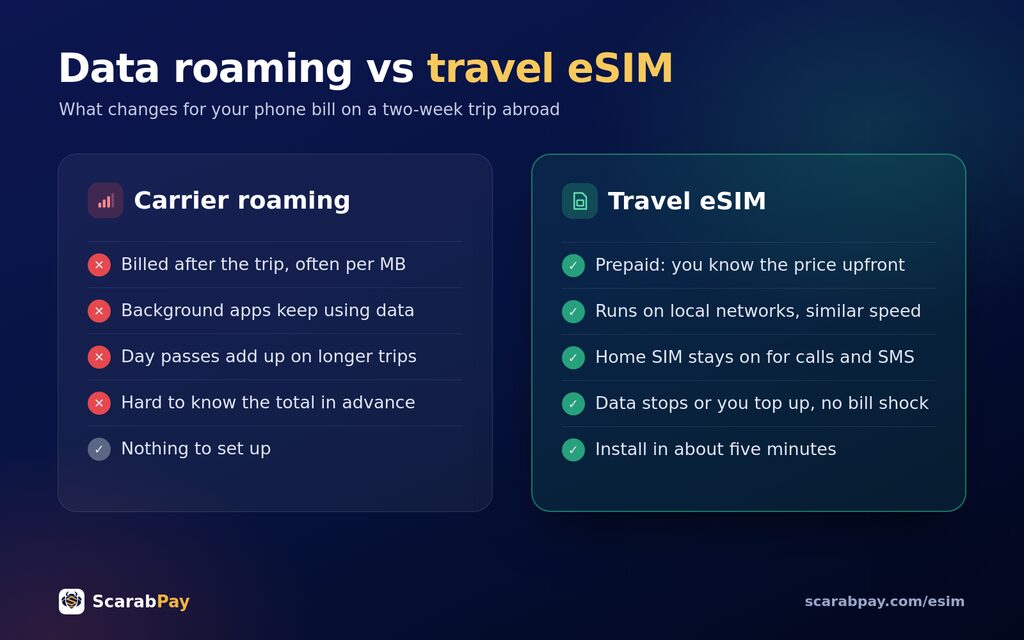
- Price: roaming is billed afterwards and can climb fast; an eSIM is paid upfront, so you know the total before you fly.
- Setup: roaming needs no setup; an eSIM takes about five minutes, once.
- Speed: both run on local networks, so speeds are usually similar.
- Your number: roaming keeps it; with an eSIM, your home SIM stays active for calls and SMS too.
- Control: with an eSIM, when the data runs out it simply stops, or you top up. No bill shock.
Popular destinations where roaming gets expensive
Turkey is a classic example. It's one of the most visited countries in the world, but it sits outside the EU's roam-like-at-home zone, so many European plans charge full roaming rates there. An eSIM for Turkey is usually far cheaper than a carrier day pass, especially for a week or more.
The same goes for the United States, where roaming from abroad is often priced per megabyte. If you're visiting for business or a long holiday, an eSIM for the USA lets you use maps, ride apps and video calls without watching the counter.
Before you travel: a quick checklist
- Check that your phone supports eSIM and is carrier-unlocked.
- Buy and install the eSIM at home, on Wi-Fi, while you can still scan the QR code calmly.
- Turn data roaming off on your home SIM.
- When you land, set the eSIM as your mobile data line and turn roaming on for that line only.
- Switch off automatic photo backups and app updates over mobile data to stretch your plan.
The bottom line
Data roaming isn't a scam; it's just convenience priced for people who don't check. If your plan covers the country, use it. If it doesn't, turn roaming off on your home SIM before you leave, and get your mobile data from a prepaid eSIM instead. You'll land connected, keep your number, and come home without a surprise on your phone bill.
Frequently asked questions
What is data roaming?
Should data roaming be on or off?
Does data roaming cost money?
Can I receive calls and SMS with data roaming off?
Is a travel eSIM cheaper than data roaming?
Rate this article
The ScarabPay editorial team writes and tests every guide with real ScarabPay accounts, cards and orders before publishing, and updates it when prices or steps change.