
Verifying your identity (KYC)
 The ScarabPay team · Updated 15 October 2026
Identity verification is required to issue cards, withdraw funds and receive referral rewards. We ask for it to protect your account and to follow anti-fraud and anti-money-laundering rules.
Accepted documents
- Passport: the data page with your photo and details.
- National ID: front and back.
- Driving licence: front and back.
Steps
- From the menu, open Settings, then Identity verification.
- Choose the document type and country, and enter the document number.
- Enter your city, address and phone number.
- Upload photos of the document, then a selfie with your ID.
- Tap Submit.
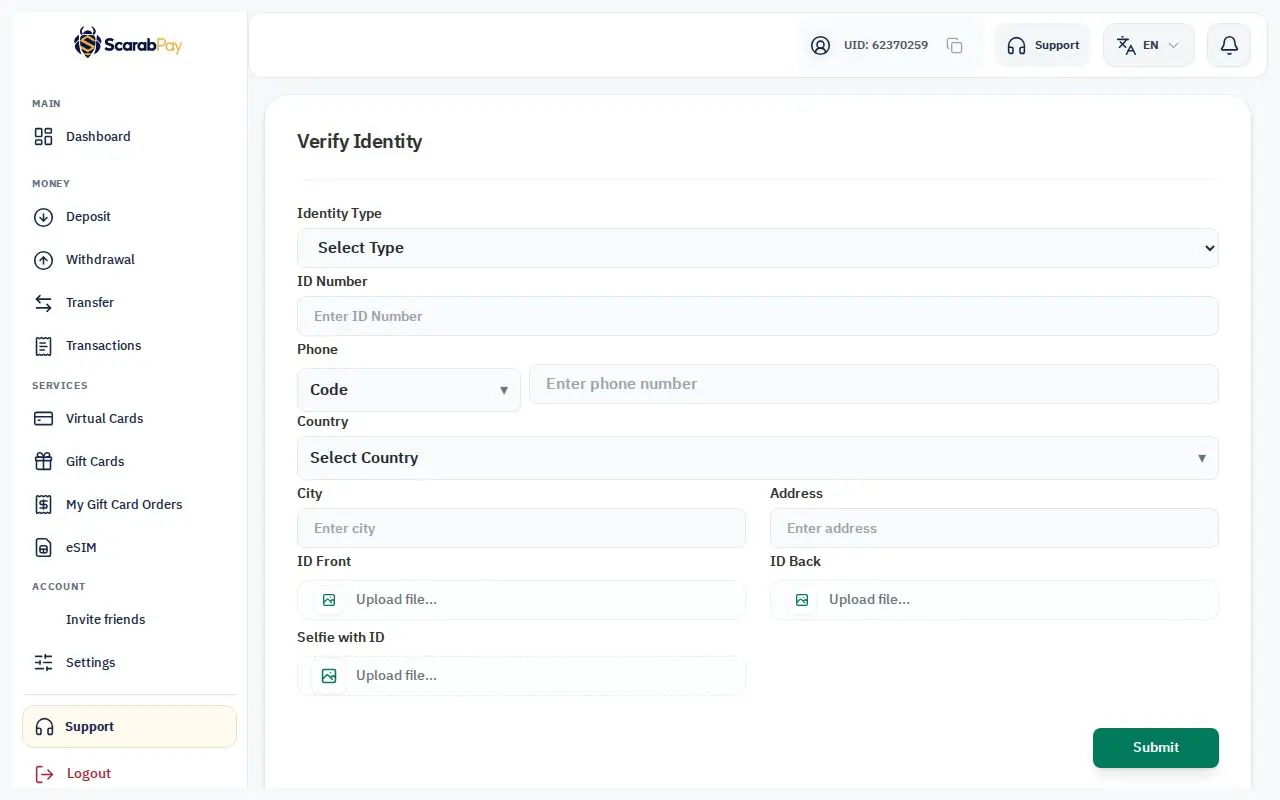
We review your request and email you when it's approved, or if something needs to be corrected.
Photos that pass the first time
- Photograph the original document — not a screen or a printed copy.
- Make sure all four corners are visible and the text is sharp, with no glare.
- For the selfie, hold the document next to your face so both are clear.
- Accepted formats are JPG and PNG, up to 10MB per image.
ImportantThe name on your document must match the name on your account. After verification, the name can only be changed through support.